SGF and variation trees
Import games while preserving branch structure, then promote, remove, and return to variations without flattening your study.
For players who want to understand the game
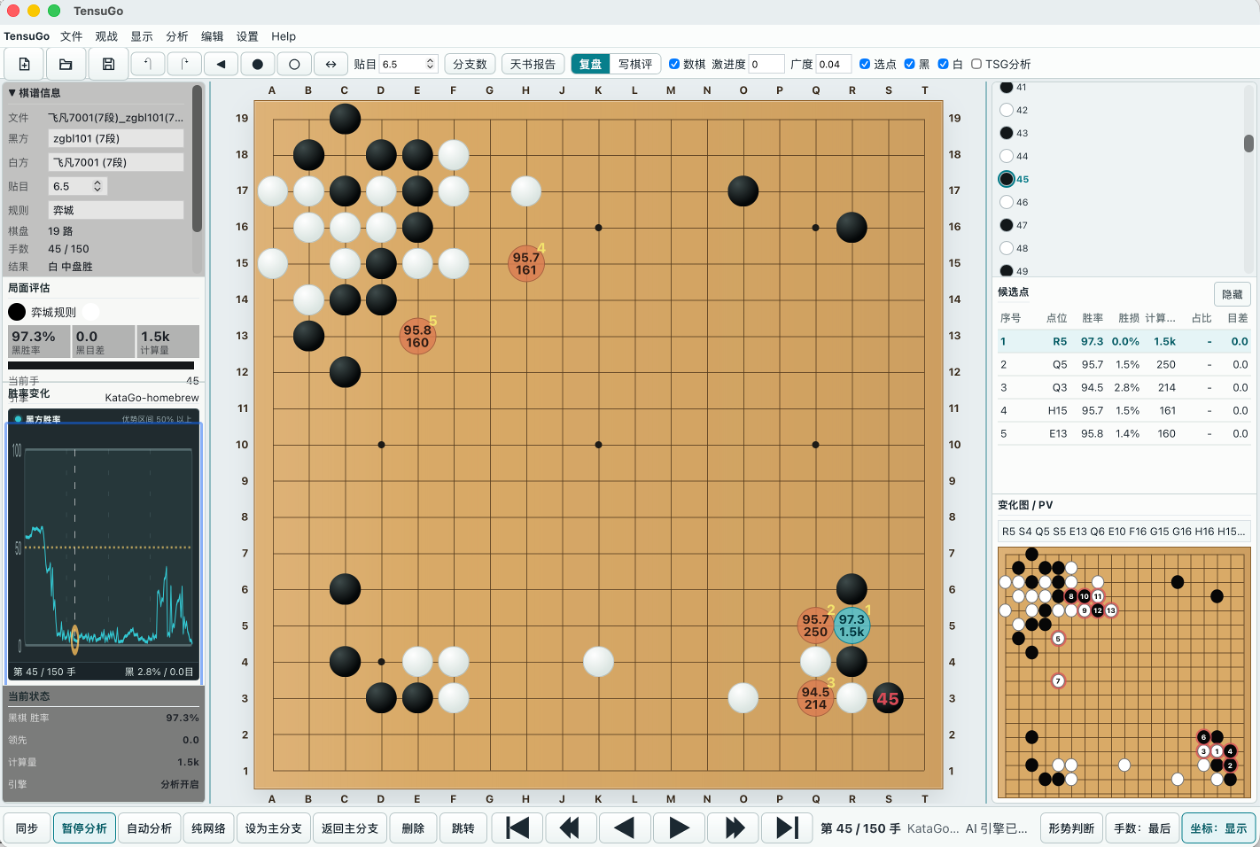
TensuGo puts your board, local KataGo analysis, variations, and review notes in one focused workspace—so you can see what changed, why it mattered, and what to practice next.
Local-first by default. Your games stay on your machine.
Now available: TensuGo V0.7.55 · Updated 2026-08-24. Create problems from reviewed positions and solve by target level with rankings, configure normal/human dual-mode engines with memory monitoring, and export richer research documents.
The problem
Most review tools stop at a score or a cloud variation. TensuGo keeps the whole argument together: the position, the alternatives, the turning point, and your own explanation. That makes one game useful long after the engine stops running.
Features
Import games while preserving branch structure, then promote, remove, and return to variations without flattening your study.
Run KataGo locally and inspect candidate moves, win rate, score lead, visits, and PV without uploading your games.
Candidate bubbles, move tables, and win-rate trends stay in sync so you can spot turning points and direction mistakes quickly.
Collect board diagrams, candidate lines, and written commentary into review material for study, teaching, and archiving.
Switch the Desktop App interface in Settings between English, 简体中文, 日本語, and 한국어.
Workflow
Open an SGF and jump into any main-line or variation position.
Start local KataGo and compare candidate moves with AI principal variations.
Keep useful branches and compare score lead, win rate, and direction.
Turn key positions and commentary into structured review notes.
Download
Windows x64 is the recommended path for most users and includes a built-in KataGo OpenCL engine. The macOS Apple Silicon build stays lightweight and expects KataGo to be installed separately.
Latest release: V0.7.55 · Updated 2026-08-24.
Includes built-in KataGo OpenCL engine, 2026.5 version.
Download Windows MSI
Does not include a built-in engine. Install KataGo with Homebrew:
brew install katago
After installing TensuGo, open Settings > Engine, then use Auto Detect. TensuGo will detect and configure the engine automatically. You can also download and configure the engine manually from the same panel.
Download macOS DMGRelease history
Create problems from reviewed positions (A/B types, automatic problem marks) and solve by target level with rankings; human-style engine profiles with configurable candidate counts and level offsets; research documents with board-screenshot cropping, variation/PV study, PDF and packed HTML export, and a standalone preview window; batch analysis console; dual-mode (normal/human) engine configuration with memory monitoring; shortcut panel; completed Japanese and Korean interface.
Improved SGF review, variations, dingshi (joseki) and problem study; added pass and handicap support; refined KataGo configuration, human-style engine support, charts, language handling, and Windows/macOS packaging.
Expanded local KataGo analysis, human-engine configuration, win-rate and score-difference views, download infrastructure, and review tools.
Established the local-first SGF review workspace with variation trees, candidate analysis, research notes, and Windows/macOS distribution.